Discord Rich Presence
Overview
Discord Rich Presence allows your Minecraft server to customize how players appear in Discord while playing on your server. With the Feather Server API, you can dynamically update a player's Discord status to show:
- Custom server icons
- Activity descriptions
- Player counts and party sizes
- Timestamps for activities
- And more!
This feature helps promote your server through players' Discord profiles, enhances the social experience, and provides useful information to friends viewing a player's status.
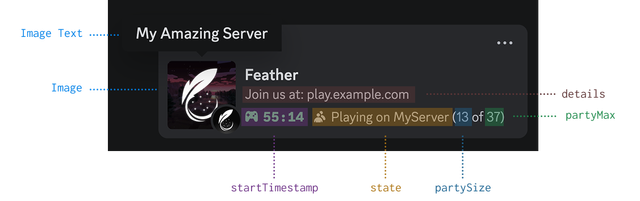
Image shows a Discord profile with custom game status showing server name, activity details, player count, and server icon
Basic Usage
Setting Discord Activity
To set a player's Discord activity, use the MetaService through FeatherAPI:
DiscordActivity activity = DiscordActivity.builder()
    .withImage("https://example.com/server-icon.png")
    .withImageText("Epic Survival Server")
    .withState("Mining diamonds")
    .withDetails("Join us at play.example.com")
    .build();

FeatherAPI.getMetaService().updateDiscordActivity(player, activity);
Clearing Discord Activity
To clear a player's Discord activity when appropriate:
FeatherAPI.getMetaService().clearDiscordActivity(player);
Creating Discord Activities
The core component is the DiscordActivity class which uses a builder pattern for easy configuration. All properties are optional, allowing you to use just what you need.
Essential Properties
DiscordActivity.builder()
    // Image shown in Discord (URL to your image)
    .withImage("https://example.com/server-icon.png")

    // Text shown when hovering over the image
    .withImageText("My Amazing Server")

    // The player's current activity (shown as smaller text)
    .withState("Fighting the Ender Dragon")

    // Main description line (shown as larger text)
    .withDetails("Join us at play.example.com")

    .build();
Advanced Features
Party Size
Show how many players are in a party or team:
DiscordActivity.builder()
    // Other properties...
    .withPartySize(4, 6) // Current: 4, Maximum: 6
    .build();
Timestamps
Show how long an activity has been in progress or when it will end:
long now = System.currentTimeMillis();
long endTime = now + (30 * 60 * 1000); // 30 minutes from now

DiscordActivity.builder()
    // Other properties...
    .withStartTimestamp(now)
    .withEndTimestamp(endTime)
    .build();
Common Use Cases
Player Joins Server
Update the player's Discord status when they join your server:
FeatherAPI.getEventService().subscribe(PlayerHelloEvent.class, event -> {
    FeatherPlayer player = event.getPlayer();

    DiscordActivity activity = DiscordActivity.builder()
        .withImage("https://example.com/server-icon.png")
        .withImageText("Epic Survival Server")
        .withState("Just joined the server")
        .withDetails("Playing on Epic Survival")
        .withStartTimestamp(System.currentTimeMillis())
        .build();

    FeatherAPI.getMetaService().updateDiscordActivity(player, activity);
});
Player Enters a Minigame
Update the activity when a player enters a specific game or area:
// When player joins a minigame
public void onPlayerJoinMinigame(FeatherPlayer player, String gameName, int playerCount, int maxPlayers) {
    DiscordActivity activity = DiscordActivity.builder()
        .withImage("https://example.com/minigames/" + gameName.toLowerCase() + ".png")
        .withImageText(gameName)
        .withState("Playing " + gameName)
        .withDetails("Round starting soon")
        .withPartySize(playerCount, maxPlayers)
        .withStartTimestamp(System.currentTimeMillis())
        .build();

    FeatherAPI.getMetaService().updateDiscordActivity(player, activity);
}
Player Completes an Achievement
Update the status to showcase a player's accomplishment:
public void onPlayerAchievement(FeatherPlayer player, String achievementName) {
    DiscordActivity activity = DiscordActivity.builder()
        .withImage("https://example.com/achievements/trophy.png")
        .withImageText("Achievement Unlocked!")
        .withState("Earned: " + achievementName)
        .withDetails("Playing on Epic Survival")
        .build();

    FeatherAPI.getMetaService().updateDiscordActivity(player, activity);

    // Reset to normal status after 5 minutes
    Bukkit.getScheduler().runTaskLater(plugin, () -> {
        updateDefaultActivity(player);
    }, 6000); // 5 minutes in ticks
}